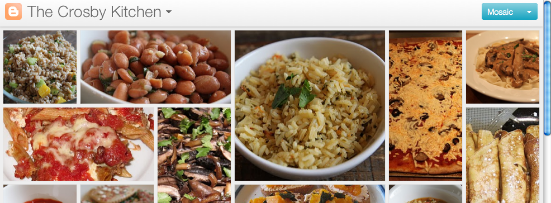
All about Dynamic Views for Readers - Blogger Help


Blogger currently offers five dynamic views for its public blogs. These views are only accessible if allowed for by the blog author.
  • Flipcard: available at [blogURL]/view/flipcard

  • Mosaic: available at [blogURL]/view/mosaic

  • Sidebar: available at [blogURL]/view/sidebar

  • Snapshot: available at [blogURL]/view/snapshot

  • Timeslide: available at [blogURL]/view/timeslide

  • As an example, the URL for accessing the Sidebar view for my blog would be  http://ramakrishnagoverdhanam.blogspot.com/view/sidebar
    .
    These views require modern browsers such as Internet Explorer 8+, Firefox 3.5+, Chrome or Safari. Many elements of these views will not work should you have an older browser.
    In all views, search is available in the upper right hand corner. Clicking on the ">" arrow in the very top left of the header bar will slide the header bar across and allow you to choose different views for the current blog as well as type in a new blog URL.
    There is also a feedback link for each view.

    Flipcard
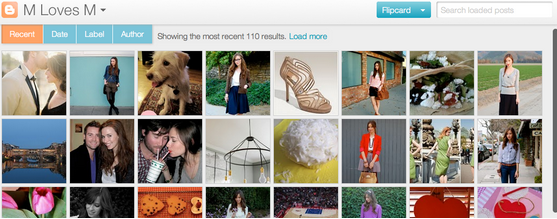
    • Mouse over any of the cards to see the post title and comment count. As you scroll down, additional posts will continue to load.
    • Click on a card to see the post in full view. You can navigate through the posts using J (older post) and K (newer post) or the arrow keys. Hit escape or click Back to all posts to return to the Flipcard view.
    • In the upper left, click to sort by DateAuthor and Category.

    Mosaic

    • Clicking on an individual tile will expand that post to the full width of the view, and clicking again will collapse the post back into its original position.
    • The exact position of the tiles is randomly determined each time the blog loads, but they will appear chronologically from top left to bottom right.
    • Once a tile is expanded, you can page down by using the "up" and "down" arrow keys as well as J and K.
    • This view is optimized for the tablet viewing, and supports screen rotation.

    Sidebar

    • Optimized for quick reading and browsing.
    • Left sidebar is list of chronological posts, with comment counts and thumbnails for individual posts.
    • and arrow keys will navigate through the posts, and comments can be displayed on the same page by clicking the Show link.

    Snapshot
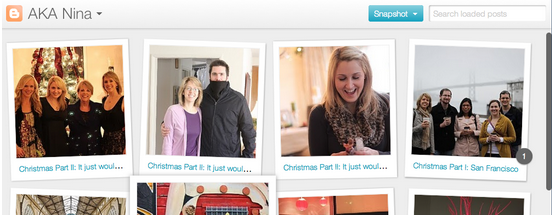
    • This view will display only the posts which have images.
    • Clicking through any photo will display the full post page, with naviagtion links at the bottom for Newer and Older posts
    • Mousing over any photo will display a post snippet

    Timeslide

    • This view breaks the blog content down into three different areas:
      • Left column: Enlarged picture with a post snippet, title, and snipppet displayed in chronological order
      • Middle column: Displays just the post title and snippet
      • Right column: Displays just the individual post titles
    • When searching for posts in this view, the results will be highlighted.
    For more information, please take a look at our article on Dynamic Views for Authors.

    Source: - http://www.google.com/support/blogger/bin/answer.py?hl=en&answer=1229061&ctx=go

    Comments

    Popular posts from this blog

    Namaste Sada Vatsale - RSS Prayer in English

      Namaste Sada Vatsale is Rashtriya Swayamsevak Sangh's prayer. This prayer is in Sanskrit except last line which is in Hindi. It is compulsory to sing this prayer in all programs of Sangh. It was written by some unknown Sanskrit professor in guidance of Dr. K. B. Hedgewar and Madhav Sadashiv Golwalkar. Originally this poem was written in Sanskrit language. Later it was translated in Hindi also. Its original form in other Indian script as well as IOAT format is given as under: RSS Prayer in Devanagari नमस्ते सदा वत्सले मातृभूमे त्वया हिन्दुभूमे सुखं वर्धितोहम् । महामङ्गले पुण्यभूमे त्वदर्थे पतत्वेष कायो नमस्ते नमस्ते ।।१।। प्रभो शक्तिमन् हिन्दुराष्ट्राङ्गभूता इमे सादरं त्वां नमामो वयम् त्वदीयाय कार्याय बध्दा कटीयं शुभामाशिषं देहि तत्पूर्तये । अजय्यां च विश्वस्य देहीश शक्तिं सुशीलं जगद्येन नम्रं भवेत् श्रुतं चैव यत्कण्टकाकीर्ण मार्गं स्वयं स्वीकृतं नः सुगं कारयेत् ।।२।। समुत्कर्षनिःश्रेयस्यैकमुग्रं परं साधनं नाम वीरव्रतम् तदन्तः स्फुरत्वक्षया ध्येय...

    Khaleja Movie Logo

    Mahesh Babus New movie Khaleja Logo released ... its taken from His twitter account Image courtesy: Twitpic

    Search Engines Notice H1 Headings

    What are H1 headings? An H1 heading is a prominent piece of text on a web page. It's like the headline of a newspaper or magazine article - it helps readers quickly understand what the web page is about. For example, if this email were a web page, "Search Engines Notice H1 Headings" would be its H1 heading. An H1 heading is plain text that lives between these HTML tags: How can H1 headings help my search engine rankings? Because headings are defined with HTML code, search engines understand that these pieces of text are of particular importance. You should include important keywords for a page in its H1 heading to tell search engines what the page is about, and help it rank higher in results for searches on those words. Do my website's pages have H1 headings? You can find out by looking at the HTML source code for every page on your site. When you're viewing the page, look for this option in your web browser. For example, in Firefox, you would clic...